TI MSP430 Programmers & Debuggers
Hardware programmers/debuggers
MSP-FET
the traditional & efficient way (also the expensive way) - https://www.ti.com/tool/MSP-FET
This programmer/debugger is the most universal one for MSP430/MSP432
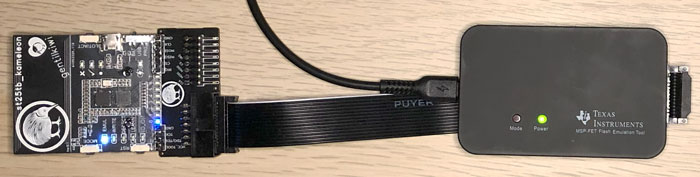
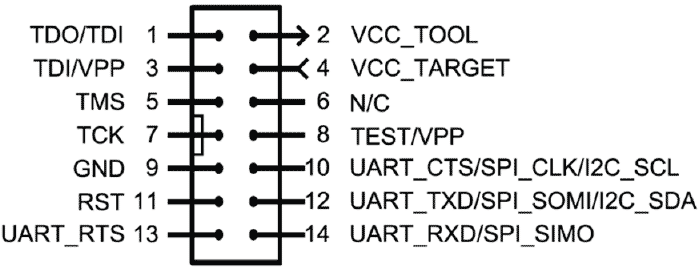
Its connector allows multiple ways of connection to boards, but usually only traditional JTAG or Spy-Bi-Wire will be needed
The big brother of
MSP-FETis namedMSP-GANG- https://www.ti.com/tool/MSP-GANG
more suited to go outside of your laboratory for programming on-the-go without a computer
More information in: https://www.ti.com/lit/pdf/slau647 § 5.6 MSP-FET Stand-Alone Debug Probe
Library & API: https://www.ti.com/tool/MSPDS
LaunchPad (Integrated debugger)
the embedded way
Launchpad development boards are very useful to begin with MSP430 microcontrollers. They embed what is necessary to debug, flash, even to make some energy traces for some versions.
See: https://www.ti.com/design-development/embedded-development/msp430-mcus.html (“LaunchPad development kits” part) for some boards.
To debug/program, Spy-Bi-Wire JTAG is generally used, a 2-wire alternative transport for JTAG, multiplexing JTAG signals onto TEST and RESET pins, with a specific entry sequence.
- Unfortunately, standard tools are not suitable without modifications, especially because of initialization sequence ;
- Fortunately, Launchpad boards embed what is called :
eZ-FET 1.x,eZ-FET 2.xoreZ-FET Lite(orez430for oldest ones) emulator (https://www.ti.com/lit/pdf/slau647) at the top of the board.
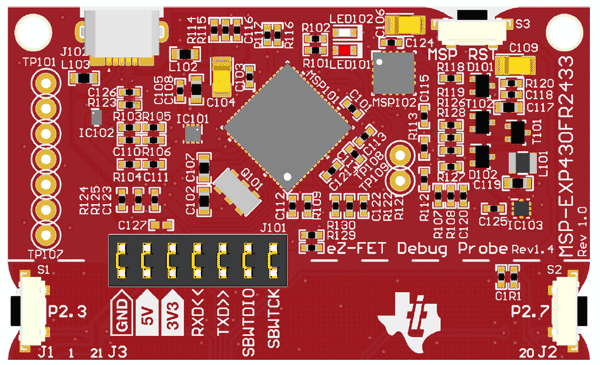
ez-FET part on MSP‑EXP430FR2433 kit:
ez-FET diagram on MSP‑EXP430FR5969 kit:
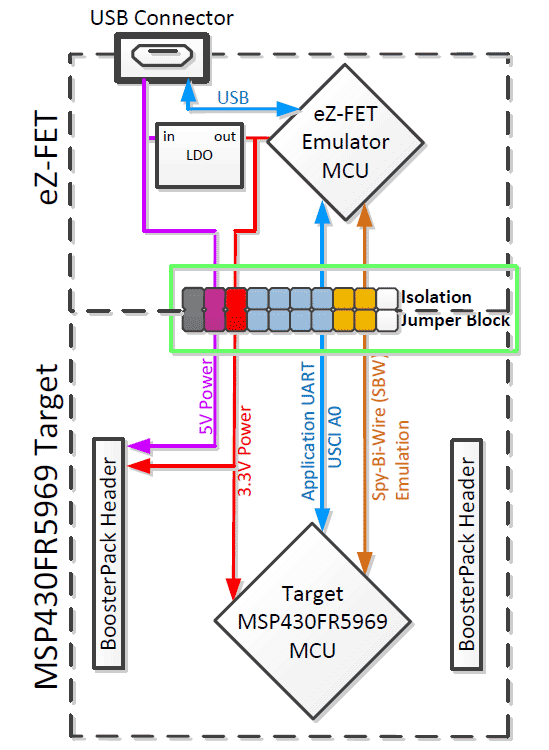
Embedded ez-FET on boards handles USB communication with computer, via virtual COM ports for UART but also for JTAG/Energytrace communication.
This is not exclusive to Texas Instruments:
- STMicroelectronics, with their Nucleo, embed ST-Link
- Nordic Semiconductor, with their NRF5*-DK, embed JLink
- …
Technically
Your not primary interest MCUs on the board dedicated to communication/trace are often more expensive than your main MCU
Historically (and on many LaunchPads), the eZ-FET is implemented using a MSP430F5528, with EnergyTrace handled by a secondary MSP430 (often MSP430G2452), though this varies by board revision.
Using a LaunchPad as a standalone debugger
share your Launchpad with friendly MSP430
It seems that the less expensive way to have a cheap programmer/debugger is to reuse a recent Launchpad board, at this time a
MSP-EXP430FR2433kit (< $10)
From TI: https://www.ti.com/product/MSP-EXP430FR2433/part-details/MSP-EXP430FR2433

Thanks to jumpers, you can isolate the eZ-FET part from the main MCU, and attach to another one.
You’ll need to connect the eZ-FET pins GND, 3V3, SBWTDIO & SBWTCK to your targeted MCU:
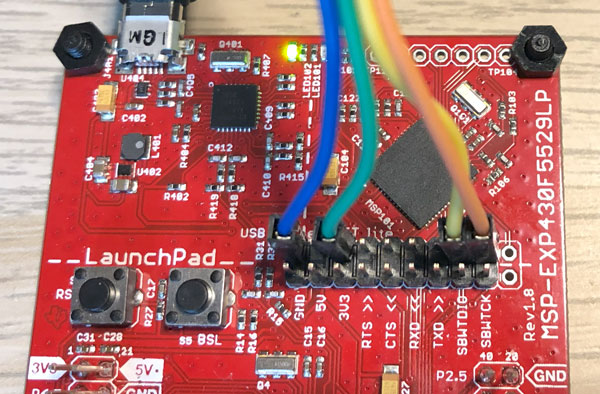
-
Example for a
MSP430FR2476on theeZ-FET liteof theMSP-EXP430F5529LP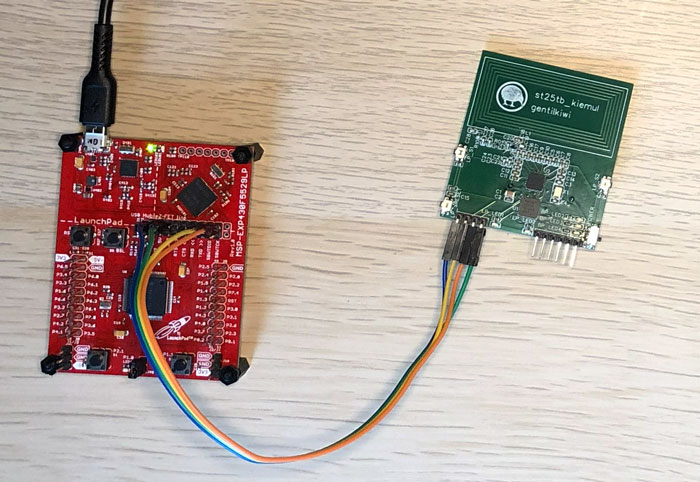
* Dll Version : 31501001 * FwVersion : 31200000 * Interface : TIUSB * HwVersion : E 3.0 * JTAG Mode : AUTO * Device : MSP430FR2476 -
Example for a
MSP430FR2673on theeZ-FETof theLP-MSP430FR2476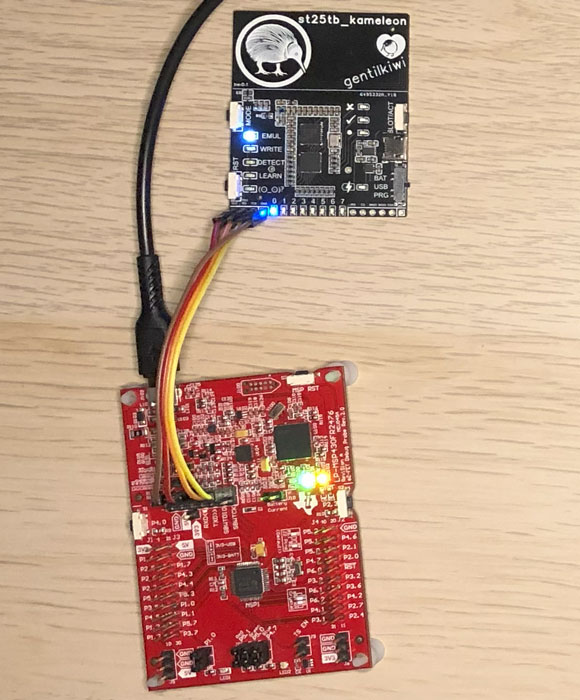
  * Dll Version : 31501001
  * FwVersion   : 31200000
  * Interface   : TIUSB
  * HwVersion   : E 6.0
  * JTAG Mode   : AUTO
  * Device      : MSP430FR2673
Software tools
- On premise
- Code Composer Studio: https://www.ti.com/tool/CCSTUDIO (Eclipse based by default, Theia proposed)
- Uniflash: https://www.ti.com/tool/UNIFLASH
- MSP430 Flasher: https://www.ti.com/tool/MSP430-FLASHER
- may require newer
MSP430.dllfrom https://www.ti.com/tool/MSPDS
- may require newer
- Cloud based
- Code Composer Studio: https://dev.ti.com/ide/ (was Eclipse based, Theia now)
- Uniflash: https://dev.ti.com/uniflash/
Cloud based tools need a browser extension & a local agent running in background
maybe one day with native browser serial communication?
MSP430 Flasher
Example here to program st25tb_kameleon.hex in a MSP430FR2673 on the eZ-FET of the LP-MSP430FR2476:
> MSP430Flasher -i TIUSB -n MSP430FR2673 -z [VCC,RESET] -e ERASE_ALL -v -w st25tb_kameleon.hex

* -----/|-------------------------------------------------------------------- *
*     / |__                                                                   *
*    /_   /   MSP Flasher v1.3.20                                             *
*      | /                                                                    *
* -----|/-------------------------------------------------------------------- *
*
* Evaluating triggers...done
* Checking for available FET debuggers:
* Found USB FET @ COM38 <- Selected
* Initializing interface @ COM38...done
* Checking firmware compatibility:
* FET firmware is up to date.
* Reading FW version...done
* Setting VCC to 3000 mV...done
* Accessing device...done
* Reading device information...done
* Loading file into device...done
* Verifying memory (st25tb_kameleon.hex)...done
*
* ----------------------------------------------------------------------------
* Arguments   : -i TIUSB -n MSP430FR2673 -z [VCC,RESET] -e ERASE_ALL -v -w st25tb_kameleon.hex
* ----------------------------------------------------------------------------
* Driver      : loaded
* Dll Version : 31501001
* FwVersion   : 31200000
* Interface   : TIUSB
* HwVersion   : E 6.0
* JTAG Mode   : AUTO
* Device      : MSP430FR2673
* EEM         : Level 5, ClockCntrl 2
* Erase Mode  : ERASE_ALL
* Prog.File   : st25tb_kameleon.hex
* Verified    : TRUE
* BSL Unlock  : FALSE
* InfoA Access: FALSE
* VCC ON      : 3000 mV
* ----------------------------------------------------------------------------
* Resetting device (RST/NMI)...done
* Starting target code execution...done
* Disconnecting from device...done
*
* ----------------------------------------------------------------------------
* Driver      : closed (No error)
* ----------------------------------------------------------------------------
*/
Reported HwVersion
| HwVersion | Description |
|---|---|
| E2.0 | eZ430 |
| E3.0 | eZ-FET lite |
| E4.0+ | eZ-FET |
| U1.40 | MSP-FET430UIF |
| U1.64 | MSP-FET430UIF |
| U3.0 | MSP-FET |
What about BootStrap Loader? (BSL)
MSP430 support BootStrap Loader. Embedded code (in ROM for some) can include BSL with UART, i2c, SPI, but now also USB.
See: https://www.ti.com/tool/MSPBSL & https://www.ti.com/tool/MSP430USBDEVPACK
BSL can be useful to flash new versions of firmware/recovery, but is not a debugger.
Even if the UART one can be seen as promising, it’s necessary to run one initialization sequence on RST & TEST pin before… making it difficult to use without a specific USB to Serial adaptater like FT232 (with usually DTR & RTS).
Drawbacks for the UART BSL:
- Requires USB-to-serial adapters with DTR and RTS ;
- Needs more pins (6 vs 4 for SBW) ;
- Poor software support compared to eZ-FET ;
- Cost often exceeds a <$10 LaunchPad.
Because I needed such a tool, I implemented a client compatible with many adapters, and with my boards: https://github.com/gentilkiwi/msp430_kibsl
Drawbacks for the USB BSL:
- A MSP430 with native USB support is needed (only 48/571 at this time) ;
- External crystal is needed ;
- Generic software to use it is needed!